Posts

Showing posts with the label Android

A wired issue of MediaPlayer on Android

Background Our application needs to play mp3 files served by our server. What we used to do is just using MediaPlayer to play that URL. However, there are more and more customers complaint about Music playing being cut off quite frequently. So I had to dig into legacy codes to find out the reason. Reproduce From existing codebase, I could tell our app respects MediaPlayer's   OnErrorListener   and if MediaPlay throw out any Error, app will try to catch them and recover. Unfortunately, we did not receive any exceptions for this part according to our Fabric crashlytics report. Besides that, this bug is not really easy to reproduce.   I knew it must be caused by user's network issue. So I tried Charles proxy and using its throttling feature. However it seems like MediaPlayer would have a special connection after connecting and Charles' throttling can not control that connection. Then I also tried Android Emulator's build-in network status simulation feature. Sti...
Gradle issue - peer not authenticated

When we tried to migrate our Gitlab from Http to Https , we met a problem of Maven Central which was also maintained as a Git repo. peer not authenticated Basically the reason is JVM can not pick up trusted CA from local machine. So we manually trusted it with commands. 1. Get the certificate file (.cer). I am using Mac so I just trusted that certificate through browser and it will be saved in Keychain Access. Then I just export that certificate as .cer file. 2. Copy the .cer file to $JDK_HOME/jre/lib/security folder 3. Run the command keytool - import - alias <alias_of_this_cert> - file < cert_file_name_you_exported . cer > - keystore cacerts - storepass changeit 4. Gradle is able to find dependencies now. NOTE : how to get current JAVA_HOME: /usr/libexec/java_home [-v '1.8'] how to transfer file through ssh: cat {origin file} | ssh {username}@{remote host} "cat - > {target file}"

How to write Gradle Plugins with Groovy for Android

Image
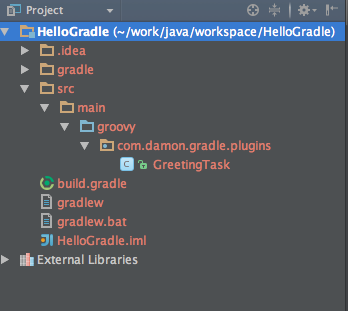
Since Android Studio being released,  I could always find that Google announce that Gradle is better than Maven and Ant. Especially it supports Groovy as script language natively. However I could not get chance to try it. Recently our project requires us to implement CI and something else. So I got chance to learn it more. Firstly I need to know how to create a customised Gradle Task using Groovy. I tried building some simple "Hello world " tasks inside of build.gradle file. They all work fine. But once I tried to implement some more complicated ones which needs importing some other libraries, it will complain can not import. So I recheck the doc from Gradle. There is another way to create a standalone plugin library. http://www.gradle.org/docs/current/userguide/custom_tasks.html So I followed the doc to create mine one. 1. Create Gradle project using Intellij 2. Add framework support -> Groovy 3. Create the source structure like this. 4. Change the bui...

Android Trick - AutoCompleteTextView & MultiAutoCompleteTextView & Spannable & EditText

Story came from I tried implement an EditText View which supports "Mention feature" like Facebook and Twitter. After user type in "@" symbol there is a dropdown list come out and let user select some item to replace that word started with "@". The first I try to use EditText and popup window to customize this component. Which I need to listen EditText text change and using popup window to show the dropdown list with suggestions. But when I tried to handle the focus between EditText and PopupWindow I gave up this way . Could not find better solution for that means when EditText get focus all the time my dropdown list can not be clicked . Because popup window needs focusable to make views inside can be clicked. But if I give popup window focus user can not type in anymore. Then I realized how stupid I worked. There supposed to be a solution from Android . Coz Contacts app support autocompletion. Then I found AutoCompleteTextView . Followed docume...

Android how to listen ListView scrolling offset problem

Today I wanted to implement the UI looks like Google plus app in both Android and IOS. One thing came out is that ListView and bottom menu. From Google Plus that bottom menu will slidedown when User scrolling the listview down and slideup when user scrolling the listview up. So the question is how to listen the listview scrolling up and down. First , there is no this api to listen how much listview scrolled by. Second, I tried the onInterceptTouchEvent in my customized ListView. It only works at first several touchevents. Then I checked the source codes of ListView and AbsListView. in function : private boolean startScrollIfNeeded ( int y ){ ... if ( overscroll || distance > mTouchSlop ) { ... if ( parent != null ) { parent . requestDisallowInterceptTouchEvent ( true ); } ... } ... } ok, thats why our interception not work anymore after the scrolling offset bigger t...

Android Trick - Pick photo from Gallery and 3rd party app

In Android we can using Intent to share data between applications. Simple usage for this part is Picking images or photos from the other applications. Normally the codes is like the following: private void pickPhotoFromGallery() {     Intent intent = new Intent();     intent.setType( "image/*" );     intent.setAction(Intent.ACTION_PICK);     //following line code will specify the dialog title of choosing different content source app     startActivityForResult(Intent.createChooser(intent, "Complete action using" ),SELECT_PHOTO ); } Noticed that if I set Intent Action as Intent.ACTION_PICK it will only select images from System Gallery App. if I called  intent.setAction(Intent. ACTION_GET_CONTENT );  It will get from the other apps. And the result is not same. From Gallery app the uri format is like : content://xxx/xx/xx but the other app will return uri like : file:///xxx/xx/xx ...

Android Trick - select Gridview item and make the cell highlighted

As Title said, I am making a customized calendar view . For date part I am using Gridview. But after I set item background and using setSelection(int) I could not highlighted the item I selected. this is the drawable for cell view background. <selector xmlns:android="http://schemas.android.com/apk/res/android">     <item android:drawable="@drawable/bg_purple_round_corner" android:state_pressed="true">     <item android:drawable="@drawable/bg_purple_round_corner" android:state_checked="true">     <item android:drawable="@drawable/bg_purple_round_corner" android:state_selected="true">     <item android:drawable="@drawable/bg_white_round_corner" android:state_pressed="false"> </item></item></item></item></selector> This is the gridview codes:                  gvDates.setOnItemClickListener(new OnItemClickListener() { ...

Android Trick - make gridview unscrollable

Damon How to make Android Gridview unscrollable. I found one solution is : GridView .setOnTouchListener( new OnTouchListener(){     public boolean onTouch(View v, MotionEvent event) {         return event.getAction() == MotionEvent. ACTION_MOVE ;     } }); the code means consume the gridview's ACTION_MOVE touch event.

Android Trick - Using intent to Send SMS and come back

Damon In Android we can use Intent to send SMS or calling phone number and something else. System will start default ( Or show a list of apps who can accept this intent ) app. Then if you want to come back to your own application after that you will need this . Intent sendIntent = new Intent(Intent.ACTION_SENDTO);  sendIntent.setData(Uri.parse("sms:" + number)); sendIntent.putExtra("sms_body", smsContent);  sendIntent.putExtra("exit_on_sent", true); startActivity(sendIntent); Not sure whether it also works for the other Intents.