Posts

Showing posts with the label Gradle

Gradle issue - peer not authenticated

When we tried to migrate our Gitlab from Http to Https , we met a problem of Maven Central which was also maintained as a Git repo. peer not authenticated Basically the reason is JVM can not pick up trusted CA from local machine. So we manually trusted it with commands. 1. Get the certificate file (.cer). I am using Mac so I just trusted that certificate through browser and it will be saved in Keychain Access. Then I just export that certificate as .cer file. 2. Copy the .cer file to $JDK_HOME/jre/lib/security folder 3. Run the command keytool - import - alias <alias_of_this_cert> - file < cert_file_name_you_exported . cer > - keystore cacerts - storepass changeit 4. Gradle is able to find dependencies now. NOTE : how to get current JAVA_HOME: /usr/libexec/java_home [-v '1.8'] how to transfer file through ssh: cat {origin file} | ssh {username}@{remote host} "cat - > {target file}"
How to write Gradle Plugins with Groovy for Android

Image
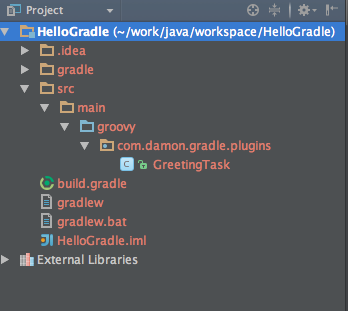
Since Android Studio being released,  I could always find that Google announce that Gradle is better than Maven and Ant. Especially it supports Groovy as script language natively. However I could not get chance to try it. Recently our project requires us to implement CI and something else. So I got chance to learn it more. Firstly I need to know how to create a customised Gradle Task using Groovy. I tried building some simple "Hello world " tasks inside of build.gradle file. They all work fine. But once I tried to implement some more complicated ones which needs importing some other libraries, it will complain can not import. So I recheck the doc from Gradle. There is another way to create a standalone plugin library. http://www.gradle.org/docs/current/userguide/custom_tasks.html So I followed the doc to create mine one. 1. Create Gradle project using Intellij 2. Add framework support -> Groovy 3. Create the source structure like this. 4. Change the bui...